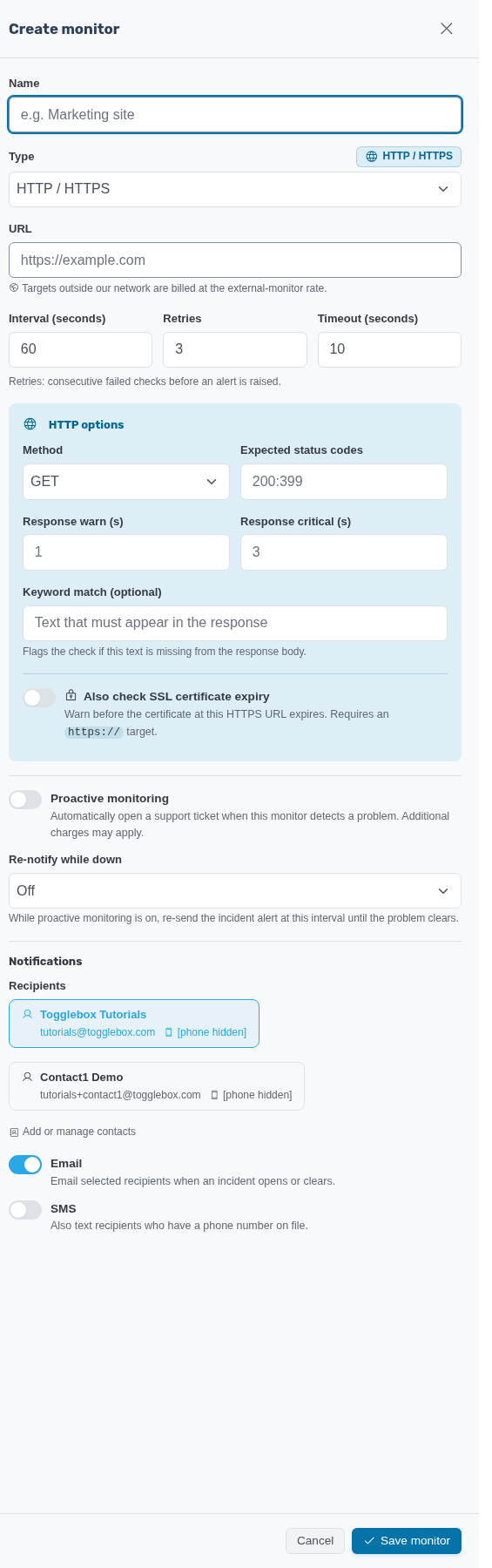
Choose a check for the service you want to monitor. A successful ping shows host reachability; it does not prove that a website works.
- Open your monitoring service and click Create monitor. Enter a Name that identifies the target.
- Choose Type. Use HTTP / HTTPS for a web endpoint, Ping for reachability, or TCP port for a listening service. Enter the target required by that type.
- Set Interval (seconds), Retries, and Timeout (seconds). For HTTP/HTTPS, review the request method and Expected status codes. A Keyword match (optional) can check expected page content.
- For an HTTPS target, enable Also check SSL certificate expiry if you need certificate checks.
- Review notification recipients and delivery channels. Review Proactive monitoring separately: it opens support tickets and may incur support charges. Choose whether to Re-notify while down.
- Click Save monitor. Wait for a healthy result, then arrange a notification test with the recipients.
If a check fails, confirm that security groups and the guest firewall allow the selected check. Ask support which source addresses the monitor uses before allowing broad access.